
Google Just Put a Price on Your Unanswered Phone
Starting October 1, some missed calls from Google Local Services Ads can count as billable leads. It's one of several changes coming to LSAs. Here's what contractors need to know and what to check now.
The phone rings. Your tech is under a house. Your office manager is on another line. The homeowner waits. Ten seconds. Fifteen. Twenty-five.
Nobody picks up, and the homeowner calls the next company on the page.
Until now, that was a lost job. Starting October 1, if that call came through your Google Local Services Ad, it may also be a charged lead.
That's the change most contractors will feel first. It isn't the only one. Google is also moving Local Services Ads into its main Google Ads platform, removing some bidding controls, and wiping out the historical reports many businesses use to judge whether the program is working.
Here's what's actually changing, what isn't, and what to do about it.
What changes on October 1
In August, Google emailed Local Services advertisers about an update to how call leads are charged. Two things change.
Missed calls can be billed. A missed call during your listed business hours can be charged as a valid lead if the caller stays on the line for more than 20 seconds.
Follow-up calls can be billed. If a customer's first call doesn't qualify as a charged lead, a later call between you and that same customer can be charged if it meets Google's lead criteria.
There's one clear exception. If your phone system makes callers press a key to reach a department, the 20-second clock doesn't start until they press it. If they never press a key, there's no charge.
Google also says it's adding safeguards against spam and robocalls. It hasn't explained how those will work, and the notice doesn't say how to dispute a missed-call charge. Plan as if the charge applies.
Why Google is doing this
Google frames this as rewarding businesses that respond quickly. Whatever you think of that, it's consistent with how Google has described LSAs for years.
In its current guidance, Google says phone responsiveness is a primary driver of your ad performance and local ranking. It tells advertisers to answer promptly, reduce missed calls, and return missed calls right away. It also says missed calls and slow responses can lower your ranking.
So a missed call now costs you in three places:
The job. The homeowner calls someone else.
Your ranking. Your responsiveness score drops, and you show up less often.
The charge. Starting October 1, you may pay for the call anyway.
The bigger change: LSAs are moving into Google Ads
You may have heard that Google is "moving Local Services Ads into Performance Max." That's partly true, and it makes the change sound bigger than it is.
Performance Max is Google's automated campaign type that runs ads across Search, YouTube, Gmail, Maps and more. Google is moving LSA management into the regular Google Ads platform under a new campaign type called "Performance Max with pay-per-lead goals." The name is new. Most of the product works the same way.
What isn't changing
You still pay per valid lead (calls, messages, bookings), not per click.
Your ads still show only on Google Search and Google Maps, in the same spots.
There are still no keywords. Google matches you to searches based on your service categories, service areas and Google Business Profile.
If you're already verified, your status and Google Verified badge carry over.
What is changing
The old LSA dashboard goes away. You'll manage campaigns and respond to leads inside Google Ads.
Your historical reports don't come with you. Past spend, impressions and campaign reports won't transfer. Your lead history will, including customer contact details, message threads and older call recordings.
Manual bidding ends. You can no longer set a maximum cost per lead. The default strategy, Maximize Conversions, lets Google set bids to get as many leads as possible within your budget.
One target cost across all your trades. If you currently set different cost targets for different services, like HVAC and plumbing, Google will replace them with one average. To keep separate targets, you'll need separate campaigns.
Weekly budgets become daily budgets. Google divides your weekly budget by seven. Your monthly spend is capped at your daily budget times 30.4, so daily spend can swing on busy days.
Your Business Profile runs more of the show. Your business name, address and hours sync from your Google Business Profile. A major change to your name or address triggers a review that can pause your ads for 24 to 48 hours.
BBB callouts are gone. Google recommends adding at least six other callouts, like free estimates or payment options.
Some things get better, too. You can change the phone number your leads route to in real time. You can also set service areas and ad schedules separately from your Business Profile.
A note if you haven't paid attention to LSAs in a while: the old Google Guaranteed and Google Screened badges were replaced by a single Google Verified badge in October 2025. The money-back guarantee that came with Google Guaranteed ended then too.
When your account moves
Google is migrating accounts in phases:
August 2026: select U.S. home and storefront service businesses, including plumbing, HVAC, electrical, roofing, lawn care and pest control.
Late 2026: broader groups, including service-area businesses without a storefront.
2027: remaining categories and non-U.S. accounts.
Many independent contractors run service-area businesses without a storefront, so there's a good chance your account hasn't moved yet. Don't assume a date either way.
Google will email the account administrator 14 days before migration, then send a reminder seven days later. If that email goes to an inbox nobody checks, you could lose your reports before you know it happened.
Before Google Moves Your Account, Do These 7 Things
This is the most useful hour you'll spend on your LSA account this year.
1. Save your reports. Google says your old performance reports won't carry over, and after migration the old dashboard is gone. Google has promised a download page. Until it appears, take screenshots. Save at least 12 months of:
total spend
leads by type (calls, messages, bookings)
cost per lead by service category
your weekly budget history
2. Download call recordings you care about. After migration, recordings are kept in Google Ads for up to 30 days.
3. Check who gets the migration email. Confirm the administrator on your LSA profile is a real person who reads that inbox.
4. Make your listed hours honest. Missed calls during listed business hours are the ones that can be charged. If you list 7 a.m. to 7 p.m. but nobody reliably answers until 8, fix the hours or fix the coverage.
5. Pull your own missed-call rate. You'll see scary statistics online about how many calls contractors miss. Most come from companies selling answering services. Ignore them and pull your own numbers from your phone system or call tracking: how many calls came in during listed hours, and how many went unanswered? Look at it by hour and day of the week. The gaps are usually predictable, like first thing in the morning, lunch, and Saturdays.
6. Clean up your Google Business Profile now. Get your name, address and primary category right before migration, not during it.
7. Tighten your service area. Google advises against targeting areas more than a two-hour drive away, because slow response hurts your ranking. If you can't get there quickly, you probably shouldn't be paying for leads there.
Stop judging LSAs by cost per lead
Starting October 1, your cost per lead will change partly because Google changed what counts as a lead. And if you haven't saved your old reports, you won't have a clean before-and-after comparison.
That's a good reason to stop leaning on cost per lead altogether. The better number is cost per booked job.
Here's how the math works, with made-up numbers:
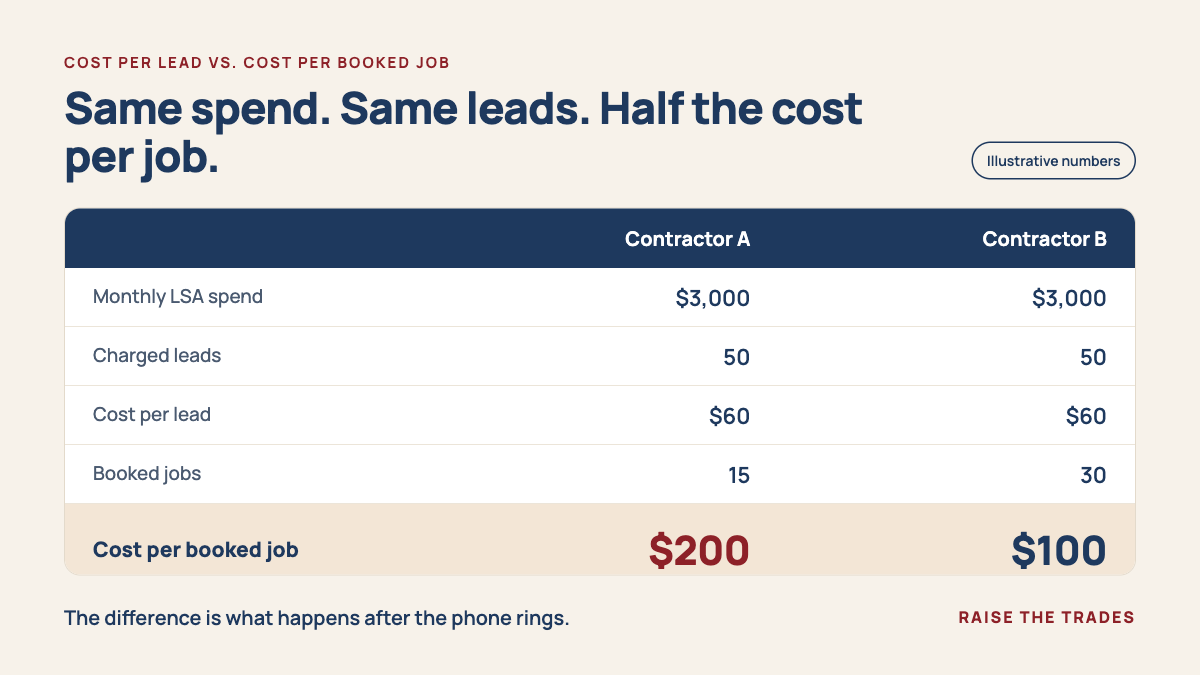
Same Google spend. Same number of leads. Half the cost per booked job. The difference is everything that happened after the phone rang.
To track this, you need four numbers each month, ideally by trade:
LSA calls received
LSA calls missed
booked jobs from LSA
cost per booked job
Your CRM or field service software should hold most of this. If it doesn't, that's worth fixing whether or not you advertise on Google.
There's one more reason to track outcomes. In the new system, you can mark each lead as "Booked" or "Completed." Google says those updates help its automated system optimize your campaign. If you never update them, Google is optimizing for lead volume, not jobs.
Google is automating the ad side. The rest is still yours.
Over the last two years, Google moved LSA reviews into Business Profiles, merged the badges into one, and is now removing manual bid caps and putting more of the bidding in its own hands.
To be fair, LSAs were never a high-control product. There were never keywords to manage or ad copy to test. And some controls are getting better, not worse. This isn't Google seizing the steering wheel. It's Google slowly taking over the few ad decisions that were left.
But notice what Google can't automate.
It can deliver the call. It can't answer it. It can't figure out whether the homeowner needs a repair or a replacement, get an estimate scheduled this week, follow up on the proposal sitting on the kitchen counter, or show up when you said you would.
That whole chain is yours: answer, qualify, book, estimate, follow up, close, earn the review, and get the next call from the same customer.
Google now puts a price on the first link. Miss the call, and you may pay for it before anyone on your team has said a word to the homeowner.
Questions to ask whoever manages your LSAs
If an agency or marketing person runs your account, ask these:
Have you saved my historical LSA reports, and where are they?
What's my missed-call rate during listed hours, and what might that cost after October 1?
Is anyone marking leads as Booked or Completed?
Do my trades need separate campaigns? Google suggests a target cost only for campaigns getting more than 15 leads a month, so smaller trades may do better combined.
Are you reporting cost per booked job, or only cost per lead?
When my cost per lead changes after October 1, how will you tell what's due to the new billing rule and what's due to performance?
If they can't answer the first two, that tells you something.
The bottom line
Google's changes to Local Services Ads are real. Most are about where you manage your ads and how much control you have over the bidding.
The change you'll notice on the invoice is simpler:
An unanswered phone now has a price.
Google can deliver the call.
Answering it, and turning it into revenue, is still your job.
Sources