
Google Is Taking Away Your Lead Price Limit. Here's What Contractors Need to Know.
If you use Google Local Services Ads, you've probably spent some time deciding how much you're willing to pay for a lead.
Google is changing how that decision gets made.
As Local Services Ads move into Google Ads, contractors who set a maximum bid per lead will lose that option. They'll still control their budgets and service areas, but Google's automated bidding will have more say over what individual leads cost.
There's another complication. The historical performance reports you'd use to judge whether those costs changed aren't moving with you.
What's actually changing
Since August 2026, Google has been automatically moving LSA accounts out of their standalone dashboard and into Google Ads. U.S. storefront home service businesses in trades like HVAC, plumbing, electrical, roofing and lawn care went first. Service-area businesses without a storefront follow in late 2026, and remaining categories in 2027. Nobody opts in. Google emails your account administrator 14 days before your date.
The new campaign carries the Performance Max name, which causes confusion. Standard Performance Max is a click-based campaign that runs across Search, YouTube, Gmail and Display. This version borrows only the name and the management system. Google says your ads still show only on Search and Maps, in the same spots. You still don't pick keywords, and you still pay per valid lead, not per click.
What changes:
The maximum cost-per-lead bid is gone. Bidding becomes automated, working toward an average cost-per-lead target for the campaign.
If you had separate targets for different trades, they merge into one. Keeping them separate now takes separate campaigns.
Weekly budgets become daily (weekly ÷ 7). Monthly spend is capped at the daily budget × 30.4, though a busy day can run higher.
BBB callouts go away.
There are real improvements, too: one login instead of two, phone routing you can change on the spot, business details that sync from your Google Business Profile, and no more insurance and license reverification.
A separate change arrived on its own schedule. Since October 1, 2026, a missed call during your listed business hours can be charged as a lead if the caller holds on for more than 20 seconds.
Before your account migrates, save your data
This is the time-sensitive part.
What moves with you: your lead history, including customer contacts, messages and older call recordings.
What doesn't: your campaign performance reports, meaning past spend, impressions and weekly trends. After migration, the old dashboard redirects to Google Ads and those reports are no longer accessible there.
Google says a download page for old reports is on the way. Until it's available, Google's own guidance is to take screenshots. At a minimum, save monthly leads, spend and cost per lead, by service category if you have it, as far back as the dashboard goes. Without that history, you'll have no reliable way to tell whether your costs changed after the move.
Two different scorecards
I've spent enough time in the home services marketplace, including nearly a decade at Angie's List, HomeAdvisor and Angi, to know that contractors and lead providers don't always measure success the same way. A platform can report a valid lead. A contractor still has to answer the phone, book the appointment, sell the work and complete the job profitably.
Those are very different scorecards. Losing the bid limit makes the contractor's scorecard the one that counts. A maximum bid worked as a rough guardrail. Without it, the only way to judge Google's price is to know what a lead is worth to you.
That means following each lead past the phone call:
Cost per lead: what you paid Google.
Cost per qualified lead: after removing spam, services you don't offer and existing customers.
Cost per booked appointment: what each scheduled call cost you.
Cost per sold job: your real customer acquisition cost.
Gross profit per sold job: the ticket minus direct costs like technician labor, parts, materials, permits and financing fees.
Revenue is the wrong comparison. A $500 repair with $250 in direct costs leaves $250 to cover marketing, overhead and profit. That $250 is what the lead has to earn back.
A cheaper lead isn't always a more profitable one
Here's a hypothetical example with illustrative numbers, not industry benchmarks. Two HVAC companies each buy 100 LSA leads in a month.
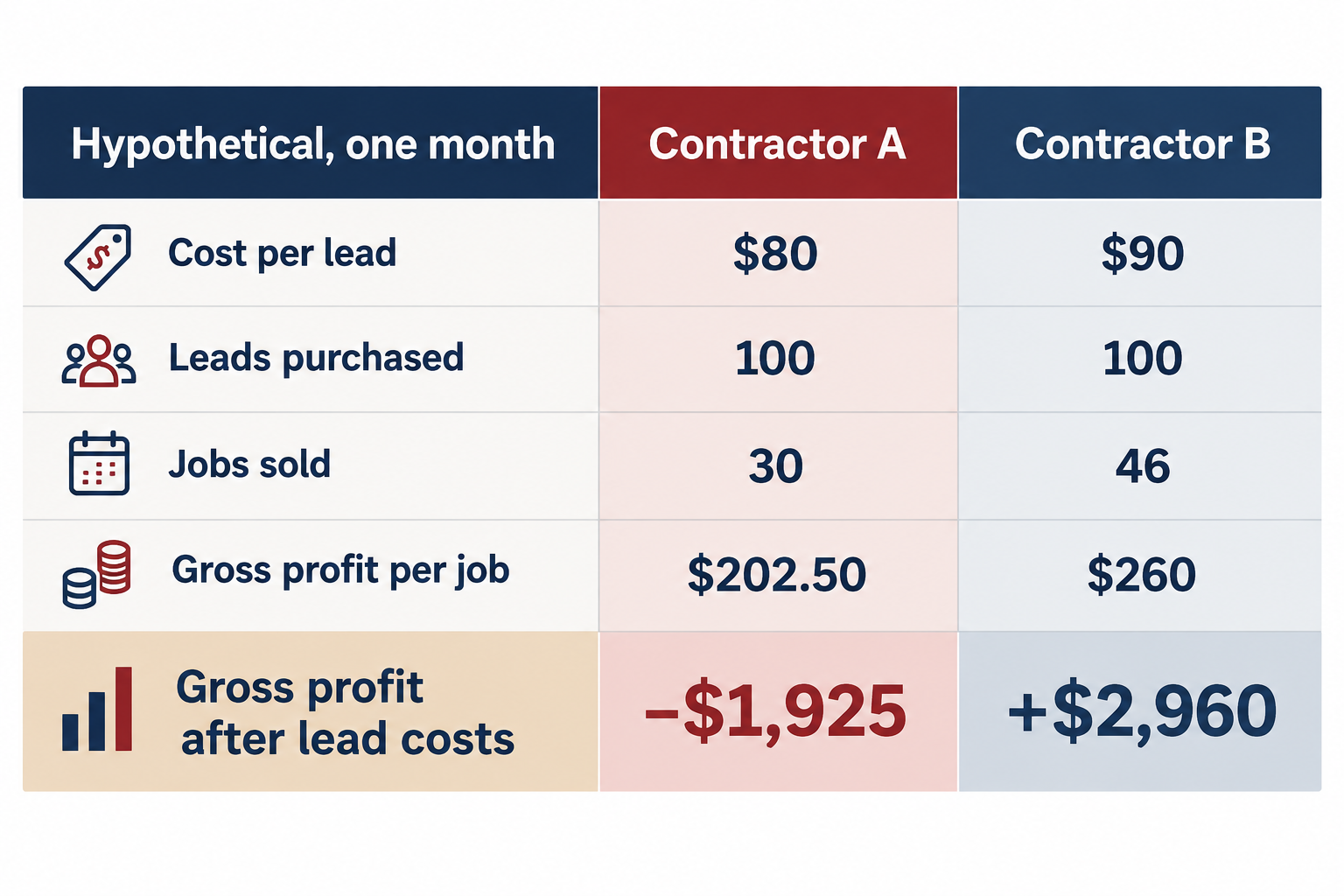
Hypothetical example. Contractor B paid more per lead and came out nearly $3,000 ahead, because more of its leads became sold jobs at a higher gross profit. Figures show gross profit after lead costs, before other overhead.
Contractor A books 45 of its 100 leads and sells 30 jobs at a $450 average ticket and 45% gross margin. Contractor B books 65 and sells 46 at a $520 average ticket and 50% margin. B paid more per lead and finished nearly $3,000 ahead in gross profit after lead costs. A lost money on its leads before covering any other overhead.
The differences all sit inside the business: how often the phone gets answered, how many calls get booked, how technicians present options and how jobs are priced.
The same math explains how a $40 lead can be expensive and a $150 lead a bargain. If a $40 drain-cleaning lead becomes a sold job one time in four, and that job leaves $120 in gross profit, you're paying $160 to earn $120. If a $150 roofing lead becomes a replacement one time in eight, and the roof leaves $4,500 in gross profit, you're paying $1,200 to earn $4,500.
What a lead is worth to you
Break-even cost per lead = gross profit per sold job × (jobs sold ÷ leads purchased)
For Contractor A, that's $202.50 × 0.30, about $61. For Contractor B, $260 × 0.46, about $120. Same trade, same market, and one company can afford to pay nearly twice what the other can.
Break-even only means the lead paid for itself. Your real limit belongs below it, leaving room for overhead and profit. How far below depends on things only you know, like how often a repair customer joins your maintenance plan or comes back for a replacement. If you count that future value, write the assumption down and check it against what actually happens.
Run the numbers by service category. A blended average hides the trade that's losing money. With one cost target per campaign, the category view also tells you whether a trade needs its own campaign.
What to do now
Our full before, during and after checklist is available as a download. The short version:
Before migration: make sure the 14-day notice goes to an inbox someone reads, save your reports, write down your current settings, match your listed business hours to the hours your phones are covered, and decide with your agency whether any trade needs its own campaign.
The first two weeks: confirm service areas, categories, phone routing and budget came over correctly, compare Google's cost target to your break-even, and rate every lead with the feedback form. Google says performance can take up to two weeks to settle, so avoid big changes unless something is clearly broken.
After that: compare results to your baseline by category over at least 30 to 60 days, and match Google leads to jobs in your field service software every week.
The next step
Before your account migrates, pull your historical reports and calculate what you're actually paying for completed jobs, not just leads.
If you can't connect your Google advertising spend to jobs sold and gross profit, now is a good time to fix that.
Contractor checklist: Local Services Ads migration
Hand this to your office manager or agency and ask them to confirm each item. Every platform step below is based on Google's migration documentation as of October 12, 2026.
Before migration
Notice and access
Confirm who is listed as the LSA account administrator, and that the email address is monitored. Google sends the 14-day notice there.
Watch for the migration banner in the LSA dashboard.
List everyone who currently has access, including your agency.
Save your history
Check the LSA redirection page for Google's report download tool (ads.google.com/localservices/gaferedirection). If it isn't live yet, screenshot your reports.
Capture monthly charged leads, spend, cost per lead and credited leads for as many months as are available, by service category where shown.
If you mark leads as booked, capture your booking rate.
Agencies managing several accounts: pull account and lead reports through the Local Services API before migration.
Document your settings
Service categories and job types
Service areas
Ad schedule and business hours
Weekly budget
Bidding mode, plus any max cost per lead or per-category cost targets
Phone and message lead routing
Verification status and badge
Callouts in use, including BBB
Calculate your baseline (from your own records)
Answer rate on LSA calls during business hours
Booking rate: booked appointments ÷ charged leads
Close rate: sold jobs ÷ booked appointments
Average ticket and gross profit per sold job, by service category
Break-even cost per lead for each category: gross profit per sold job × (sold jobs ÷ charged leads)
Decisions to make with your agency
Does any trade need its own campaign to keep a separate cost target? If yes, set it up in Local Services before migration.
Do your listed business hours match the hours your phones are covered? Missed calls during listed hours can be charged if the caller holds more than 20 seconds.
Postpone major Business Profile changes (name, address, primary category) until after migration.
Agree on who reviews leads and how often, and how results will be reported after migration.
During the transition (first two weeks)
Log in to Google Ads and confirm service areas, categories, ad schedule and photos match your notes.
Confirm the phone number leads route to.
Confirm the daily budget (weekly budget ÷ 7) and remember monthly spend can reach daily budget × 30.4.
Review the campaign-level cost target against your break-even numbers.
Set lead email notifications. Everyone with access is opted in by default; at least one person must stay on.
Add structured callouts to replace BBB (Google suggests at least six).
Rate every lead in the Leads page (Goals → Conversions → Leads) using the feedback form.
Track daily: charged leads, cost, and cost per conversion (Google's term for cost per lead).
Note any missed-call charges.
Avoid major changes for two weeks unless something is broken: wrong phone number, wrong areas, or no leads at all.
If something is broken: call Google's migration support line, +1-844-205-0011 (Mon–Fri, 9 a.m.–8 p.m. ET). Pause the campaign if leads are clearly misrouted.
After the change
Start measuring after the two-week ramp-up.
Evaluate over at least 30 to 60 days, and compare to the same months last year where possible.
Compare by category: charged leads, cost per lead, booking rate, close rate, cost per sold job, gross profit after lead cost.
Download leads weekly and match them to jobs in your CRM or field service software.
Review spending when cost per sold job rises above what a category can support, or when one category drops while others hold.
Revisit the decision to split categories into separate campaigns if one trade consistently costs more than it's worth.
Recheck business hours and call coverage each season.
FAQs
Are Google Local Services Ads going away? No. Google is moving LSAs out of their separate dashboard and into Google Ads, where they become a Performance Max campaign with pay-per-lead goals. Ads still appear on Search and Maps in the same spots, and you still pay per valid lead, not per click.
When will my LSA account migrate? Google started in August 2026 with select U.S. home and storefront service businesses, including HVAC, plumbing, electrical, roofing and lawn care. Service-area businesses without storefronts and accounts with custom bidding or booking setups follow in late 2026, with remaining categories and non-U.S. accounts in 2027. Your account administrator gets an email 14 days before your date.
Can I still set a maximum cost per lead? No. Manual bidding, including a max cost per lead, isn't supported after migration. You keep your budget and a campaign-level cost-per-lead target. If you want different targets for different trades, you'll need separate campaigns.
Will I lose my LSA data? Your lead history (contacts, messages and older call recordings) moves to Google Ads. Your campaign performance reports, such as past spend and weekly trends, do not. Save them before your migration date. Google says a download page is coming; until then, it recommends screenshots.
Does Google charge for missed calls on Local Services Ads? Since October 1, 2026, a missed call during your listed business hours can be charged as a lead if the caller stays on the line more than 20 seconds. If your phone system requires the caller to press a key, the timer starts at the key press. Make sure your listed hours match the hours someone is answering.
Sources
Google Ads Help: Local Services Ads transition to Performance Max campaigns with pay-per-lead goals (checked Oct 12, 2026)
Search Engine Land: Local Services Ads come to Google Ads via Performance Max (July 20, 2026)
Search Engine Roundtable: Google to charge for missed and subsequent calls on LSAs (Aug 2026)
PPC Land: Google charges Local Services advertisers for missed calls over 20 seconds (Aug 25, 2026)
Search Engine Land: Google automates lead credits for Local Services Ads (2024)
Search Engine Roundtable: Google working on fixing Local Service Ads bug (2026)
Search Engine Roundtable: Local Service Ads bug serving wrong locations (Oct 1, 2026)