
AI Receptionists for Contractors: Do They Actually Win More Jobs?
Your AI receptionist answered the phone. Did you get the job?
Picture a cold Tuesday in January. At 6:40 p.m., a homeowner's furnace quits, and she calls the first company she finds on Google. Your office closed at 5:00, so an AI receptionist picks up. (This is a hypothetical, but every contractor knows the call.)
That call can end three ways. The AI takes her information and emails you a transcript, and by the time someone calls her back at 8:00 the next morning, she has already hired someone else. Or the AI collects the details, tells her someone will call within 15 minutes, and texts your on-call tech, who does. Or the AI books her into the first open slot on tomorrow's board, and she gets a confirmation text before she hangs up.
Same software category, three very different outcomes. That's why the useful question about an AI receptionist for contractors is whether it turns more calls into profitable jobs, not how well it talks.
My family built and sold an HVAC business, and I spent nearly a decade on the marketplace side of home services at Angie's List, HomeAdvisor and Angi. Both sides taught me the same thing: a call is only worth something if it becomes a job you can do at a profit. This guide is written from that point of view.
What is an AI receptionist for contractors?
An AI receptionist is software that answers your phone (and often your texts) in natural speech. It can greet callers, ask what they need, collect their information, and, depending on how it's set up, transfer the call, alert you, or book an appointment.
It competes with two older options: your own office staff and a human answering service. A traditional answering service gives you a real person with real judgment, usually priced per minute or per call, but most of them take messages rather than book jobs. An AI answering service answers instantly, never calls in sick, and costs less per call, but its judgment is only as good as its setup. Some providers now blend the two. Smith.ai, for example, lets AI-answered calls transfer to a live receptionist.
Start with your missed-call rate, not the software
Before you sit through a single demo, find out what's happening to your calls today. An AI receptionist can do two different jobs for a contracting business: win work you're currently losing, and take routine work off your office staff. Your call data tells you which one you'd be buying.
Pull 30 days of call records from your phone system or call tracking software and count:
Total inbound calls, separated into business hours and after hours
Calls answered live
Calls that went to voicemail or were abandoned
How many missed callers got a callback, and how fast
Then listen to 15 or 20 missed-call voicemails and callbacks. You'll learn quickly whether those were new customers, existing customers, vendors or spam.
The numbers usually point one of three ways. If you're missing a lot of new-customer calls, especially after hours or during busy mornings, an AI receptionist is a revenue opportunity. If you answer nearly every call but your CSRs spend their day on rescheduling and "when will the tech arrive" calls, it's a time-saving tool. That can be worth paying for, but it won't show up as new jobs. Many shops have some of both.
If you run Local Services Ads, there's a second reason to know this number. Under a policy Google put in place on October 1, 2026, a missed call during your listed business hours can be charged as a lead if the caller stays on the line for more than 20 seconds. If your phone menu asks callers to press a key, the timer starts at the key press (Search Engine Roundtable, reporting Google's notice to advertisers). Some missed calls can now cost you the ad charge as well as the job.
What an AI receptionist can actually do
Most products can handle the basics. The features that move money depend on your setup.
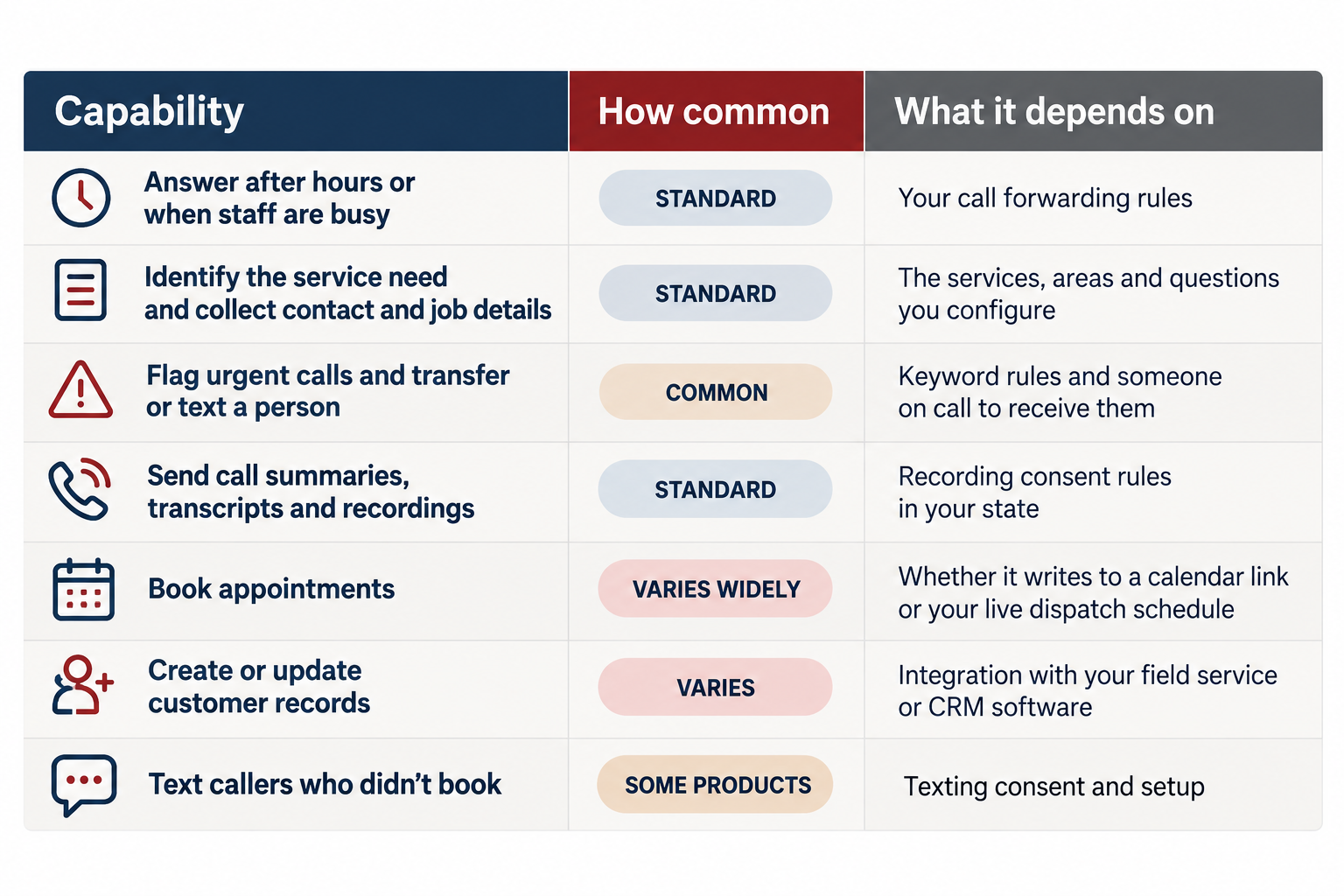
Booking straight into ServiceTitan, Jobber or Housecall Pro is the strongest version, but it isn't the only version worth paying for. A standalone tool that answers every after-hours call, separates the burst pipe from the estimate request, and hands your dispatcher a clean list of qualified callers at 7:00 a.m. can be well worth the money. So can one that takes 40 "is my tech on the way" calls a week off a stretched office manager.
Answering a call isn't the same as booking a job
During my years in the marketplace business, I saw how differently lead providers and contractors measure success. A platform counts a handled call or a delivered lead. A contractor still has to call back, book the appointment, run the call, sell the work and complete the job profitably. AI receptionist vendors tend to report the first scorecard. Your bank account runs on the second.
When you evaluate any AI phone answering for contractors, ask where each call lands:
A message or transcript. Valuable only if your process gets a person back to the caller fast, especially for urgent work.
A request or calendar booking. Better, but someone still has to confirm it fits the schedule, the service area and the technician's skills.
A booked job in your dispatch system, checked against real capacity, zones and job types. This is true AI appointment booking for contractors. ServiceTitan says its AI voice agents book against live capacity and the job types you allow, and Jobber's AI Receptionist books using your online booking settings or creates a request when it can't.
None of these is wrong. Each one needs a different follow-up process, and the cheaper options only pay off if that process exists.
Even the best version stops at an appointment, and an appointment isn't revenue yet. For a repair, the technician still has to diagnose the problem and the homeowner still has to approve the work. For a system replacement, a remodel or a roof, the visit usually produces an estimate, and that estimate still has to close. Vendors tend to report booked appointments as the win. Follow the call further: appointment, then estimate or diagnosis, then sold job.
Will homeowners accept an AI answering the phone?
The research is mixed, and it points to a clear rule.
In a Gartner survey of 5,728 customers, 64% said they'd prefer companies not use AI for customer service, and their biggest worry was that it would make reaching a person harder. More recent research from Five9, a contact center software company, found most consumers are willing to try AI for service, but about two-thirds still prefer talking to a human.
The pattern: people tolerate AI when it helps them and resent it when it stands between them and a person.
AI tends to work well after hours, when the alternative is voicemail, and for simple requests like booking a tune-up, confirming an appointment or checking arrival times. It frustrates people when they can't reach a human, when they have to repeat everything after a transfer, when it guesses about prices, and when the caller is already upset.
Set these rules before going live:
Tell callers they're speaking with an AI assistant.
Let them reach a person by asking.
Treat a gas smell as a safety call first. The AI should tell the caller to leave the building right away, avoid light switches and phones inside, and call 911 and their gas utility from a safe distance outside (Pennsylvania PUC guidance). Then it should alert your on-call person.
Send other emergencies to a person immediately: active leaks, no heat in freezing weather, burning smells from electrical equipment.
Pass along the summary so nobody has to tell the story twice.
Where the technology is heading
The category is moving quickly from taking messages to booking jobs. In October 2026, call analytics company Invoca launched AI agents for home services that it says book directly into ServiceTitan and Salesforce Field Service. It's built for large brands like Servpro and Vivint, with no published pricing, so it isn't a realistic option for most independent contractors. But it shows where the tools are headed, and for most smaller shops, the most capable version will arrive through the field service software they already use.
How much does an AI receptionist cost?
Pricing models vary: a flat add-on, per call, per unique caller or per minute. Published prices as of October 2026 include:
Jobber AI Receptionist: $29 per month as an add-on, on top of a Jobber plan
Goodcall: $79, $129 or $299 per month, billed by the number of unique callers
Smith.ai AI Receptionist: free tier with 25 calls; Pro starts at $150 per month with per-call rates and overage charges
ServiceTitan: a per-call usage fee with no long-term commitment; no dollar amount published
Housecall Pro and RingCentral: no published price for their AI receptionists on their pricing or product pages
Ask what the price includes at your call volume, what overages cost, whether booking or integrations cost extra, and whether you need a particular software plan to use it. Count your own time too. Someone has to set up services, service areas and rules, then read transcripts for the first few weeks.
Is an AI receptionist worth it for a small contracting business?
Here's a simplified hypothetical. A contractor gets 100 inbound calls a month and answers 70. They add an AI receptionist that costs $300 a month, and it handles 25 calls that used to go unanswered.
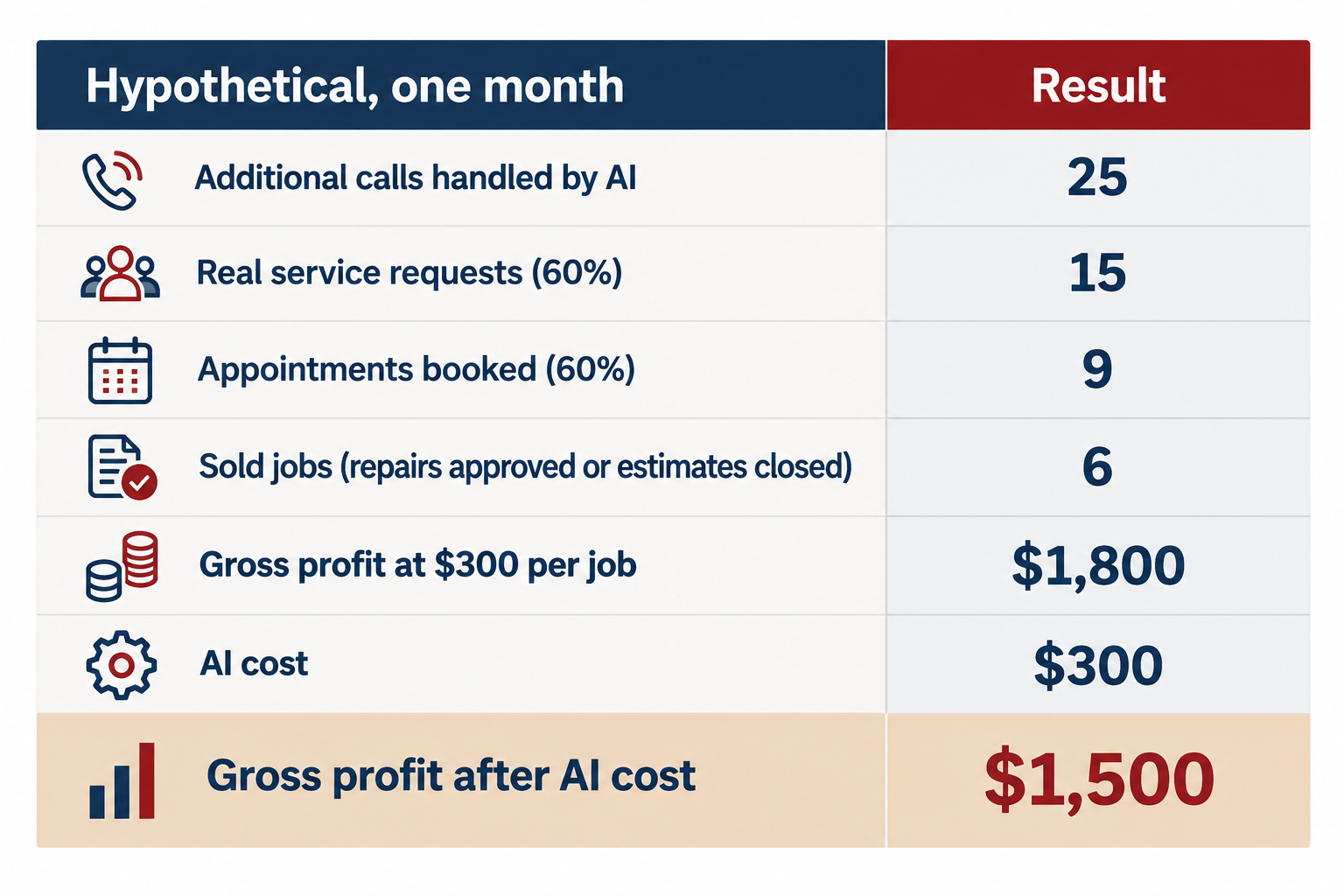
Now the part most ROI pitches leave out. Some of those callers would have become customers anyway. They'd have left a voicemail, called back, or answered when your office returned the call. If half of those six jobs would have been booked regardless, the AI produced three incremental jobs worth $900, and $600 after its cost. If your team already returns every missed call within ten minutes, the incremental number could be close to zero, and the case for the software rests on time saved.
To find your break-even point:
Monthly AI cost ÷ gross profit per additional sold job = additional jobs needed to break even
In this example, $300 ÷ $300 = one additional sold job a month. That's a simplified test. The gross profit still has to cover your overhead, and a single good month doesn't prove anything.
How to measure whether it's working
Use your baseline. Each month, compare your missed-call rate and callback times to the 30 days before launch. Tag AI-handled calls in your field service software so you can track how many became booked appointments, estimates, sold jobs and gross profit, and compare those rates with calls your staff handled. Read ten transcripts a week for the first month to catch wrong answers early. Give it 60 to 90 days, and compare against the same months last year if your business is seasonal.
Before you buy: four things to check
Work through these before your first demo. Each comes with the vendor questions that matter most. The full buyer's checklist has more.
Your missed calls. How many new-customer calls are you missing, and when? That tells you whether you're buying more jobs, more office time, or both. Ask vendors: What would this cost at my call volume, including overages? Can I start with after-hours calls only?
Your booking process. What happens to a missed call or a message today, and how fast does someone follow up? Ask: Where does a booking land: a message, a calendar or my dispatch board? How does it handle emergencies, and can callers reach a person whenever they ask?
Your software. Does your field service platform already offer an AI receptionist? If you're considering a standalone tool, what does it need to connect to? Ask: What exactly does the integration do? Where do calls go if the integration or phone system goes down?
Your measurement. Can you follow a call to a booked appointment, an estimate and a sold job? Ask: How will I know which jobs came from AI-handled calls? Can I review recordings and transcripts, and how are they stored?
You don't need perfect attribution before you fix a call-handling problem. If new customers are reaching voicemail today, start there. Pick the simplest measurement you can keep up with, such as tagging AI-handled calls in your field service software and reviewing them monthly, and tighten it as you go. Just judge the tool by booked appointments, estimates and sold jobs, not by how many calls it answered.
Need help finding where your calls are leaking? Raise the Trades works with independent contractors on exactly this. Our Revenue Engine Audit starts with what happens to your calls and leads today, then helps you decide whether AI belongs in the mix and how to set it up so you can measure what it's worth.
AI Receptionist Buyer's Checklist for Contractors
Use this before and during vendor demos. Fill in Part 1 before you talk to anyone.
Part 1: Know your starting point
Inbound calls per month (last 30 days): ____
Percent answered live during business hours: ____
Percent answered live after hours: ____
Missed calls that got a callback, and median callback time: ____
Share of missed calls that were new customers (listen to 15–20): ____
Booking rate on answered new-customer calls: ____
Average gross profit per sold job, by main service: ____
Hours per week your office spends on routine calls (confirmations, arrival times, rescheduling): ____
Field service software and phone system you use today: ____
What you're mainly trying to fix: missed revenue, office workload, or both
Part 2: Questions for every vendor
Booking and integration
Where does a booked appointment land: a message, a calendar, a request, or my dispatch board?
Does it integrate with my field service software (ServiceTitan, Jobber, Housecall Pro or other)? Is it a native integration, an API connection, or Zapier?
Does it check real technician capacity, service zones and job types before booking?
Can I limit which job types it books and which it hands to a person?
Does it create or update customer records, or only send notes?
Can it handle multiple service areas, trades and price points?
Emergencies and people
How does it recognize an emergency, and can I set the keywords? For a gas smell, does it tell callers to leave the building and call 911 and the gas utility before anything else?
Who gets alerted, how (call, text), and how fast?
Can callers reach a person any time they ask?
When it transfers, does the person receive a summary so the caller doesn't repeat themselves?
Does it tell callers they're talking to an AI?
What does it say when it doesn't know an answer, such as pricing or warranty questions?
Pricing and contract
What is the pricing model: flat, per call, per minute, or per unique caller?
What would I pay at my call volume, including overages?
Are booking, integrations, texting or extra phone numbers charged separately?
Does it require a specific plan of my field service or phone software?
Is there a free trial or month-to-month option? What's the cancellation notice?
Recordings, privacy and compliance
Are calls recorded? How are callers notified, given my state's consent rules?
Where are recordings and transcripts stored, for how long, and who can access them?
If it makes outbound follow-up calls or texts, how does it handle consent? (AI-generated voices count as "artificial voice" under federal robocall rules, per a 2024 FCC ruling.)
Reliability
What happens if the integration, internet or phone system goes down? Where do calls go?
Can I review every recording and transcript?
How quickly can I change scripts, hours or service areas?
Measurement
How will I know which booked jobs came from AI-handled calls?
Can calls be tagged in my field service software so I can track sold jobs and gross profit?
What reports does the vendor provide, and do they stop at "calls handled"?
Part 3: Run a fair test
Start with one use: after-hours calls or overflow during busy hours.
Set emergency rules and an on-call contact before going live.
Read at least ten transcripts a week for the first month.
After 60–90 days, compare missed-call rate, booked appointments, sold jobs and gross profit against your Part 1 baseline.
Ask honestly how many of those jobs your team would have won anyway.
Break-even check: monthly AI cost ÷ gross profit per additional sold job = ____ additional jobs needed each month.
FAQs
What does an AI receptionist do for a contractor? It answers calls and often texts, asks what the caller needs, collects their details, flags emergencies, and either books an appointment, creates a request, or sends you a summary. What it can book depends on whether it connects to your scheduling or field service software.
How much does an AI receptionist cost? Published prices as of October 2026 range from a $29 monthly add-on for Jobber users to 79–299 a month for standalone tools like Goodcall, with some providers charging per call. Check overages, integration costs and required software plans.
Is an AI receptionist better than an answering service? It depends on what you need. AI answers instantly and costs less per call, and some can book jobs directly. A human answering service brings better judgment for unusual or upset callers. Some providers combine both, with AI answering first and a live person available.
Can an AI receptionist book appointments in ServiceTitan, Jobber or Housecall Pro? Each of these platforms now offers its own AI receptionist that books into its schedule. Standalone tools vary: some integrate directly, some connect through tools like Zapier, and some only send messages. Ask a vendor to show a booking landing on your board during the demo.
Do customers mind talking to an AI receptionist? Surveys show many people prefer a human, mainly because they worry about not reaching one. Trust rises sharply when callers know a person is available. Disclose that it's AI, let callers ask for a person, and send emergencies to a human right away.
How do I know if an AI receptionist is worth it? Measure your missed-call rate first. Afterward, track how many AI-handled calls become sold jobs and the gross profit they produce, and subtract jobs you would have won anyway. Divide the monthly cost by gross profit per job to find how many extra jobs you need to break even.
Should an AI receptionist handle emergency calls? It should recognize them and get them to a person fast, not try to resolve them. For a gas smell, it should first tell the caller to leave the building and call 911 and the gas utility from outside. For flooding, no heat or electrical burning smells, it should transfer or alert your on-call person right away.